Pro Tips
General
React Native vs Native iOS: What Your Users Actually Feel
Jan 3, 2026
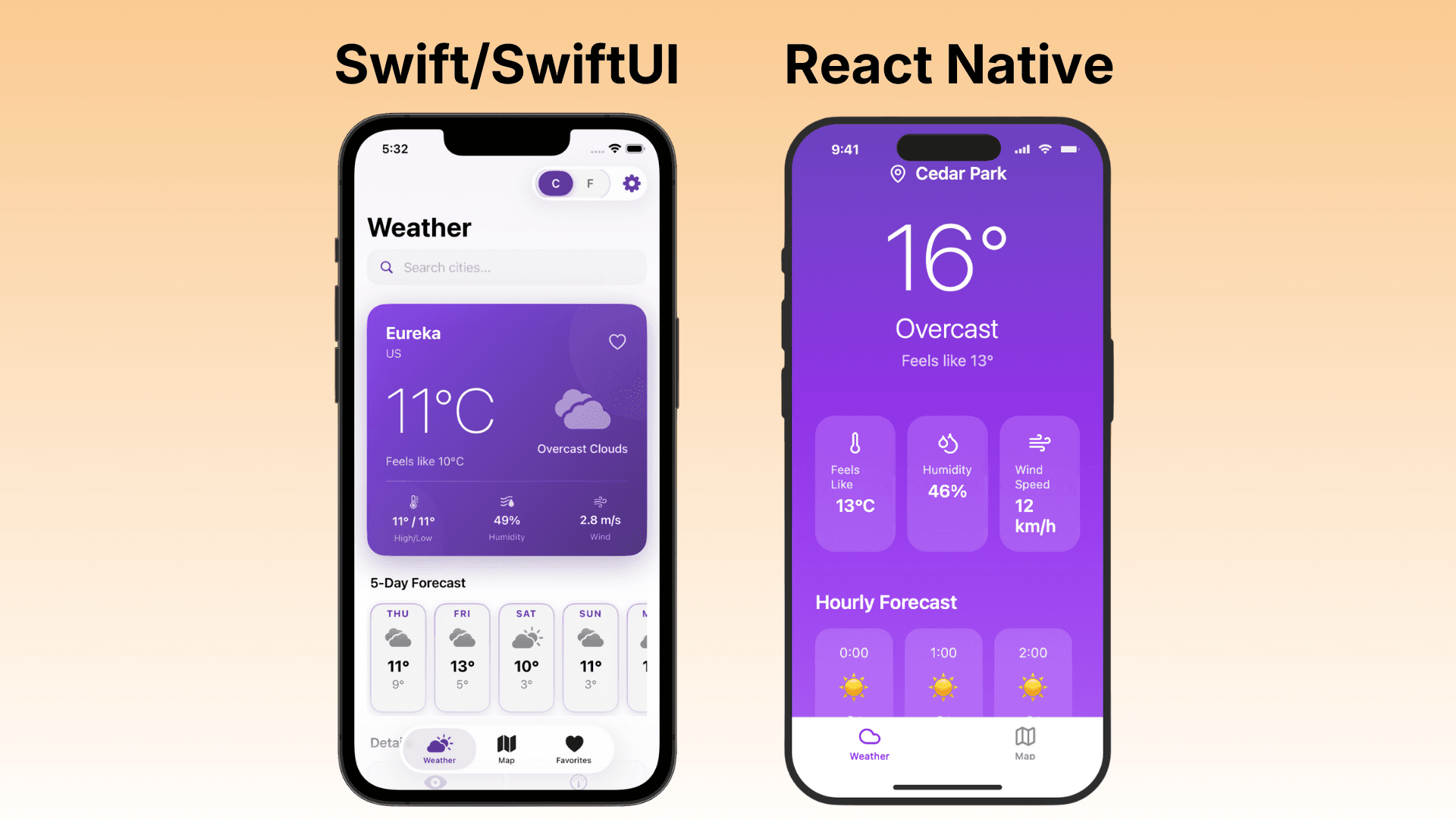
Your users don't know what React Native is. They don't care about JavaScript bridges or native modules. They've never heard of the "new architecture."
But they know when something feels off.
They feel it when a scroll stutters. When a button doesn't respond quite right. When an animation looks choppy. When the keyboard slides up a half-second too slow.
They can't explain it. They just know: this app feels cheap.
The 16 Millisecond Problem
Your iPhone screen refreshes 60 times per second. On newer Pro models, it's 120 times per second.
That gives your app 16 milliseconds (or 8 milliseconds) to render each frame. Hit that target consistently, and everything feels smooth. Miss it, and users see "jank" — that stuttering, juddering feeling that makes an app feel broken.
Native iOS apps have an advantage here. They run directly on the device, using Apple's own frameworks. There's no translation layer. No bridge. No interpreter.
React Native works differently. Your JavaScript code runs in a separate thread, communicating with native components through a bridge. Every interaction — every scroll, every tap, every animation — requires this communication.
Most of the time, it works fine. But under pressure — complex animations, heavy lists, simultaneous interactions — that bridge becomes a bottleneck.
And users feel it.
What "Feeling Native" Actually Means
When developers say an app "feels native," they're describing something specific. It's not just about speed. It's about dozens of tiny details that add up to an experience.
Scroll Momentum
iOS has a specific scroll physics that users have internalized over years of iPhone use. The deceleration curve. The bounce at the edges. The rubber-band effect when you pull past the content.
Native apps get this for free — it's built into UIKit. React Native apps try to replicate it, but the feel is often slightly different. Not wrong, exactly. Just... off.
Users don't consciously notice. But subconsciously, something doesn't match their expectations.
Touch Response
When you tap a button on a native iOS app, the response is instantaneous. The button highlights. The action fires. There's no perceptible delay between your finger and the response.
React Native apps process touch events through JavaScript. In well-optimized apps, this delay is imperceptible. In others, there's a subtle lag — maybe 50 or 100 milliseconds — between touch and response.
That's faster than most people can consciously perceive. But studies show users can feel delays as short as 16ms. The brain registers it as "sluggish" even if you can't explain why.
Animation Curves
iOS uses specific easing curves for its animations. The way a modal slides up. The way a navigation view pushes in from the right. The way elements spring into place.
These curves are deeply familiar to iOS users. They're part of what makes an iPhone feel like an iPhone.
React Native can approximate these curves, but approximation isn't the same as native. The default animation libraries often use different timing functions. The result looks similar but feels subtly foreign.
Gesture Recognition
Native iOS apps handle gestures with Core Animation and UIKit Gesture Recognizers — systems that have been refined for over a decade.
Swipe to go back. Pull to refresh. Pinch to zoom. Long press to preview.
These gestures are supposed to be responsive to the millisecond. They should track your finger perfectly, with no lag between movement and visual feedback.
In React Native, complex gestures often require libraries like React Native Gesture Handler or Reanimated. These are excellent tools, but they add complexity. And complexity creates opportunities for things to feel slightly off.
The Performance Gap Is Real (But Nuanced)
Let's be fair to React Native. In 2025, the performance gap has narrowed significantly.
The "New Architecture" — including the JSI (JavaScript Interface) and Fabric renderer — has eliminated the old JavaScript bridge for many operations. Apps built with the new architecture are faster and more responsive than ever.
For simple apps — forms, lists, basic navigation — a well-built React Native app can feel nearly indistinguishable from native.
But "nearly" is doing a lot of work in that sentence.
According to benchmarks, native iOS apps still use less memory and achieve more consistent frame rates, especially during complex operations. Discord, one of the most prominent React Native apps, has been transparent about selectively rewriting performance-critical components in native code when React Native couldn't deliver the experience they needed.
The more complex your app, the more likely you are to hit React Native's limits.
What Users Actually Notice
Let's get specific. Here are the moments where users feel the difference:
Long Lists
Scrolling through a feed of hundreds or thousands of items. Native apps handle this effortlessly — iOS's table view system is highly optimized for exactly this use case.
React Native apps often struggle here. Even with virtualization (rendering only visible items), there can be blank frames during fast scrolling. Items pop in a moment too late. The scroll feels less responsive.
Complex Animations
Anything beyond simple fades and slides. Parallel animations. Interactive gestures that control animation progress. Physics-based springs.
Native apps can run these entirely on the GPU, independent of any code execution. React Native apps often need to coordinate between JavaScript and native layers, creating opportunities for frame drops.
Keyboard Interactions
The keyboard in iOS is deeply integrated with the system. Native apps handle keyboard appearance, avoidance, and input seamlessly.
React Native apps frequently have issues here. The keyboard covers input fields. The view doesn't scroll to keep the focused field visible. The animation of the keyboard sliding up doesn't quite match the animation of the content moving.
It's the kind of thing that makes users think "this doesn't feel like a real iPhone app."
Heavy UI Updates
When lots of elements need to update simultaneously — a real-time dashboard, a complex form with validation, a live-updating feed — native apps handle it smoothly because they're not bottlenecked by JavaScript execution.
React Native apps can stutter during these moments. The JavaScript thread gets busy, and the UI becomes less responsive until it catches up.
The Design Language Problem
Beyond performance, there's a subtler issue: design language.
Native iOS apps are built with UIKit or SwiftUI. These frameworks enforce — or at least strongly encourage — iOS design patterns. The navigation paradigms. The typography. The spacing. The way elements are grouped and presented.
React Native apps are often built by web developers who bring web conventions to mobile. The result can feel like a website wrapped in an app container:
Hamburger menus instead of tab bars
Web-style buttons instead of iOS buttons
Custom navigation that doesn't follow iOS patterns
Missing native features like swipe-to-go-back
iOS users have been trained by years of native apps. When your app doesn't match those patterns, it creates friction — even if users can't articulate why.
The Latest iOS Features
Every year, Apple announces new features at WWDC. Native apps can adopt them immediately.
iOS 26 introduced Liquid Glass — a new design language with frosted glass effects, dynamic blur, and depth. Native SwiftUI apps got this automatically.
React Native apps? They have to wait for the community to build support. Sometimes that takes months. Sometimes the implementation is incomplete. Sometimes it never comes at all.
This isn't just about shiny new features. It's about your app feeling current versus feeling dated. Users notice when an app looks like it was designed for an older version of iOS.
The App Store Factor
Apple's App Store reviewers have seen hundreds of thousands of apps. They know what native feels like. And they're increasingly skeptical of apps that feel like web wrappers or cross-platform ports.
Apps built with React Native aren't automatically rejected. But apps that feel non-native — apps with web-style UI, sluggish performance, or non-standard navigation — are more likely to face scrutiny.
Guideline 4.2 (Minimum Functionality) is often cited for apps that don't feel sufficiently "native." If your app feels like it doesn't belong on iOS, reviewers may decide it doesn't belong in the App Store.
When React Native Makes Sense
This isn't an anti-React Native manifesto. React Native is a powerful tool with legitimate use cases:
You need Android and iOS simultaneously. If you're a startup with limited resources and you absolutely must ship to both platforms at once, React Native's code sharing is a real advantage.
Your app is simple. Basic CRUD apps, content viewers, simple utilities — apps where the UI isn't the differentiator can work well in React Native.
Your team is JavaScript-first. If you have web developers and no native iOS expertise, React Native lets you ship something rather than nothing.
Speed to market trumps everything. Sometimes getting an app out fast is more important than getting it perfect.
But if user experience is your priority — if you want your app to feel premium, polished, and professional — native iOS development has advantages that React Native can't match.
What Premium Apps Have in Common
Look at the apps that are universally praised for their iOS experience:
Things (task management)
Apollo (Reddit client, before it shut down)
Halide (camera)
Fantastical (calendar)
Carrot Weather
What do they have in common? They're native iOS apps, built with Swift and UIKit/SwiftUI.
They feel like they belong on an iPhone. They respect iOS conventions. They're fast and responsive. They adopt new iOS features quickly.
Users describe them as "beautiful" and "polished" and "delightful" — words that are rarely applied to cross-platform apps.
That's not a coincidence.
The Real Question
Here's what it comes down to:
What do you want your users to feel when they use your app?
If the answer is "I don't care, as long as it works" — React Native might be fine.
If the answer is "I want them to feel like this app was made for their iPhone" — you probably want native.
Users can't see your codebase. They don't know what framework you used. They just know how your app makes them feel.
And native iOS apps — built with Swift, using Apple's own frameworks, following Apple's own design language — feel like they belong.
Everything else feels like a compromise.
Final Thought
Technology should be invisible. The best apps don't make you think about how they were built. They just work — smoothly, responsively, intuitively.
Native iOS apps disappear into the experience. You're not using "an app." You're just doing the thing the app helps you do.
That's the difference users feel. Even if they can never explain it.
More from the guide
General
Apr 7, 2026
Best AI iOS App Builders in 2026 (Honest Rankings)
You can now switch between Friendly, Formal, and Bold tones with a single click inside the prompt editor.
General
Apr 7, 2026
Nativeline vs Vibecode in 2026: Native Swift vs React Native
You can now switch between Friendly, Formal, and Bold tones with a single click inside the prompt editor.
General
Apr 7, 2026
Nativeline vs Superapp in 2026: Same Language, Different Philosophy
You can now switch between Friendly, Formal, and Bold tones with a single click inside the prompt editor.